Label

Application Android Cheat Android Game Android Game Pc
Not-
Found
Tampilkan postingan dengan label Application Android. Tampilkan semua postingan

Unlock Root apk

http://androcket.ru/uploads/posts/2013-01/1358244262_1330489551_unlockroot-2.3.0.jpg


Unlock Root Pro 4.1.2 ya'dari namanya saja Anda pasti sudah bisa menebak kalau fungsi dari software ini adalah untuk Root Android.Apa itu Root?.Mungkin sobat sudah tahu yaitu untuk mendapatkan hak pengguna sepenuhnya sehingga kita dapat menghapus aplikasi bawaan pabrik,semua aplikasi yang berformat


apk dapat di install dan masih banyak lagi keuntungan lainnya.Anda tidak perlu kuatir apakah perangkat Anda menjadi rusak,software stabil dan aman karena menggunakan aktivasi.


Fitur-fitur :
  • Root your device with Unlock Root can help you: 
  • overclocking  
  • Underclocking the which can help save battery 
  • Mods to improve battery life 
  • Access to apps that might require superuser permissions
  • Removal of bloatware apps such as pre-installed by manufacturers or carriers 
  • Deeper customization 
  • Flashing ROMs such as CyanogenMod, MIUI 
  • Gaining access to features that might otherwise have your carrier charged you a fee for ie WiFi / USB tethering.
  •  
Pro Version :
  • One-click Get Root Access Permission
  • Support Android 2.2- 2.3
  • Support Android 4.0-4.1
  • Support Samsung Galaxy SIII (S3), Galaxy Note II (Note2)
  • Support Google Nexus 4 / 7 / 10
  • Support HTC One X / S,Droid DNA,EVO,Incredible,Sensation,Tattoo
  • Support Amazon Kindle Fire / HD 7"

How to install :

  • Install the software Pro 4.1.2 Unlock Root 
  • When finished, click 2 times Unlock Root Pro 4.1.2 shortcut on the desktop  
  • Please register to Unlock Root Pro 4.1.2 using the serial key


Link Download


Tusfiles  Dropbox

Link_1  Link_2


Posted by
Azka Atmawinata

More

Super User Apk

https://blogger.googleusercontent.com/img/b/R29vZ2xl/AVvXsEjB8cv7qPfdGZwP3DgOzNErgzV9qy2txmAvZXcBtbvt_ZY4B8NWyGIaaa7THMEFEABP4W828pmzu7N58ZDePNO_zWaGCwhikij_ZLylq_ZRsKI1R9uVxg_gTb7cJNpS3wwZk3xYkLAXSMs3/s1600/superuser1.png 

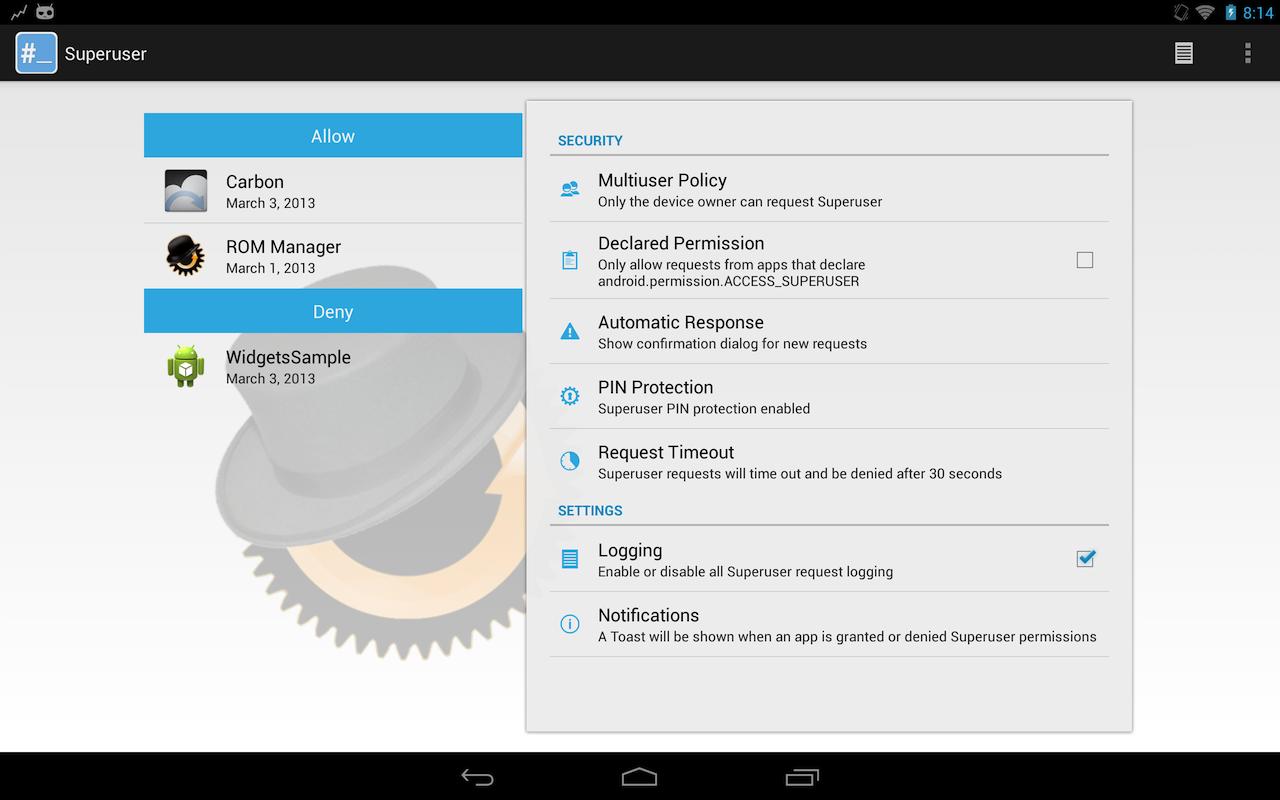
Rooting telepon Anda memberi Anda kontrol total. Dipasang aplikasi ini setelah rooting android Anda. Mengelola hak Superuser untuk ponsel Anda. Aplikasi ini hanya dapat berjalan jika anda sudah me-root Android anda. Download file apk dan ternyata banyak aplikasi akan meminta akses root!
Catatan: App dan biner akan memiliki versi yang berbeda. Aplikasi ini diperbarui lebih sering daripada biner adalah.
Aplikasi ini tidak dapat dihapus jika dipasang dengan ROM atau root. Jika tidak ada pilihan uninstall, itu karena Anda meletakkannya di / system / app.

Tidak mungkin untuk sebuah aplikasi yang akan diinstal di / system / app oleh toko Play. Bahkan, partisi seluruh sistem / dibaca hanya pada saat runtime. Satu-satunya cara untuk sebuah aplikasi untuk ditempatkan di / system / app adalah melalui proses rooting (yang biasanya menginstal Superuser), atau dengan melakukan mount ulang partisi sistem sebagai baca / tulis dan manual menempatkan di sana. Aplikasi superuser ini akan memudahkan anda untuk melakukan manajemen user root anda. Namun, anda bisa mendownload di Google Play ata disini saya share link dari APKField sehingga anda dapat menyimpan file APK yang anda download.

Izin yang diminta:
Internet – memperbarui biner
Eksternal penyimpanan – backup / restore untuk pengguna elit
NFC – menciptakan memungkinkan tag untuk pengguna elit
Boot – memperbaiki database pada booting
Apa yang Baru?

– Perbaiki FC ketika memasuki preferensi pada perangkat pra-HC
– Meningkatkan updater biner
– Tombol Tambahkan ke tindakan bar pada tablet untuk mengakses halaman info


 Screenshot :


https://lh6.ggpht.com/voRMBGR0ENmovFJUKsVi61xcn00j6Hjbn4u91qS5ZsJrve9CeD7E4CEnlBPdXaw8FA=h900


http://getandroidstuff.com/wp-content/uploads/2012/09/SuperUser-vs-SuperSU-Root-Management-at-its-Best.jpg


 Link Download

Posted by
Azka Atmawinata

More

SuperSu Apk

https://blogger.googleusercontent.com/img/b/R29vZ2xl/AVvXsEgOYSdndzNvmCr9zsE4Dm9qoyry0LRM7elSjYzyl_rE4bpbJZzAt0UhdiAamRAQrtFAmi2rpmScETpUc2gZ3wgBNhlaXh9ozQPDyjAPB_1NCVbOX_uJpScGX7fW2iigL4X5eRMf1ZlP1LA4/s1600/maxresdefault+(Compressed+by+masterbama.blogspot.com).jpg 

SuperSU allows for advanced management of Superuser access rights for all the apps on your device that need root. SuperSU has been built from the ground up to counter a number of problems with other Superuser access management tools.
Features include:
- Superuser access prompt- Superuser access logging- Superuser access notifications- Per-app notification configuration- Temporary unroot- Deep process detection (no more unknowns)- Works in recovery (no more segfaulting)- Works when Android isn't properly booted- Works with non-standard shell locations- Always runs in ghost mode- Wake on prompt- Convert to /system app- Complete unroot- Backup script to survive CyanogenMod nightlies- Icon selectable from 5 options + invisible- Theme selectable from 4 options- Launch from dialer: *#*#1234#*#* or *#*#7873778#*#* (*#*#SUPERSU#*#*)NOTE: Not all phones take both codes. On some phones you need to use single *# instead of double *#*#

The Pro version additionally offers:

- OTA survival mode (no guarantees)- Full color-coded command content logging (input/output/error)- Per-app logging configuration- Per-app user override- Grant/deny root to an app for a set amount of time- PIN protection- Per-app PIN protection- Adjust auto-deny countdown
The discussion and support thread can be found on XDA-Developers here:
http://forum.xda-developers.com/showthread.php?t=1538053
SUPERUSERThis is meant to replace Superuser (if installed), you use either one or the other. You cannot combine them. Statements that this breaks Superuser are therefore completely nonsensical.
NOTICE: A SPECIAL PROCEDURE IS NEEDED FOR UNINSTALLATION. IF YOU DO NOT LIKE THE APP, DO *NOT* JUST UNINSTALL IT, YOU *WILL* LOSE ROOT.
Superuser access management runs through a so called "su binary". There can be only one of these at a time. So if you install SuperSU, your previous superuser access management solution will no longer operate. So if you want to switch back: (1) Open that application, and search for an option for it to install/update/replace the "su binary". (2) Confirm root-using apps are using the superuser solution you want. (3) Uninstall SuperSU.

TRANSLATIONSWant to help translate SuperSU ? See http://www.getlocalization.com/supersu/ !
IN-APP PURCHASESThese are completely optional and more like donations. They do not unlock any functionality.

 Screenshot :


Link Download


Mirror 

Zippshare  Sendspace

Link_1    Link_2


Posted by
Azka Atmawinata

More

Adobe Flash Player Android

 http://cellphonequick.com/wp-content/uploads/2012/06/Adobe-Flash-Player-Android-4.1.jpg


Download Adobe Flash Player for Android 4 even after its removal from the Google Play Store.

Support for Adobe Flash was removed from Android when Jelly Bean (version 4.1 of Google’s mobile OS) was rolled out in 2013, replacing the older Ice Cream Sandwich incarnation. The Adobe Flash Player was pulled from the Google Play store at the same time.

In mobile terms, Flash will ultimately lose out to the more versatile HTML5. There’s no Flash support on Apple’s iOS either. Yet many websites still use Flash extensively and, without a Flash Player on your Android phone or Android tablet, you won’t be able to browse them.

While you can’t 'officially' download and install the Adobe Flash Player for Android, the player itself is still available. You can find the Flash Player APK here. Without it on your Android device, you’ll have trouble accessing Flash-reliant content such as catch-up TV services, animations, streaming audio and video, plus many of the best casual games that run inside a web browser.

This Adobe Flash Player for Android download is easy to install, but you should only do so if you have a device running version 4.0 of Google’s software or higher. If you downloaded the app before Google removed it, you still get selected updates and security patches.

Admittedly, Adobe Flash on Android is a stop-gap solution while we wait for HTML5 to replace the Adobe format. But that isn’t happening as fast as everyone would like and so this Flash Player still has an important role to play.

Verdict: A must-have app for Android mobiles, enabling you to browse the web as you would on a desktop system and experience the whole internet without any compatibility issues.

Note: This app requires Android OS 4.0 or higher. Click the Download button while browsing on your Android device and you'll get an APK file. To install this file on your Android device, you must first allow Android to install files from 'unknown sources'. You can find this option in Settings > Security. Once this option has been enabled, locate the Flash Player APK file and tap it to start the installation. For the best Flash experience, use it with a compatible web browser, such as Mozilla Firefox.

     screenshot :


http://droidviews.com/wp-content/uploads/2013/03/Flash-player-android.jpg

http://www.indir.com/resimler/adobe-flash-player-9609-92.jpg 

http://www.droid-life.com/wp-content/uploads/2011/12/ICSflash1.jpg


Description :

Flash Player is a browser-based application runtime that delivers a complete web browsing experience for your device including access to your favorite videos, games and interactive content.

It is optimized for high performance on mobile screens.

Get the latest versions from the Old versions section because freewarelovers.com software does not determine the latest version correctly.

Example: 10.1.120.1 and 10.1.105.7 are newer than 10.1.95.1

Download

Adobe Flash Player 11.1.111.9 seem to be the latest available version. Below you can find file(s) assigned to this version:


    Compatibility with Android 2.X, 3.X, 4.X supported devices
    Performance improvements
    Bug fixes related to security and stability

These updates address an object confusion vulnerability (CVE-2012-0779) that could cause the application to crash and potentially allow an attacker to take control of the affected system.
Old versions

Below are the earlier versions of Adobe Flash Player. If you are aware of a newer version of Adobe Flash Player or an older one, which is not listed here, please feel free to add it!

Adobe Flash Player 11.1.111.8
Adobe Flash Player 11.1.111.5
Adobe Flash Player 10.3.185.25
Adobe Flash Player 10.3.185.24
Adobe Flash Player 10.3.185.23
Adobe Flash Player 10.3.185.22
Adobe Flash Player 10.3.185.21
Adobe Flash Player 10.2.157.51
Adobe Flash Player 10.2.156.12
Adobe Flash Player 10.2.155.67
Adobe Flash Player 10.1.95.1
Adobe Flash Player 10.1.92.8
Adobe Flash Player 10.1.72.7
Adobe Flash Player 10.1.72.4
Adobe Flash Player 10.1.72.10
Adobe Flash Player 10.1.61.68
Adobe Flash Player 10.1.120.1
Adobe Flash Player 10.1.106.16
Adobe Flash Player 10.1.106.15
Adobe Flash Player 10.1.105.9
Adobe Flash Player 10.1.105.7


Posted by
Azka Atmawinata

More

My Blog List

Diberdayakan oleh Blogger.

Translate

Popular Posts

Followers

Copyright © 2012 All Science There Are HereTemplate by :Urangkurai.Powered by Blogger.Please upgrade to a Modern Browser.